MiniStep is designed exclusively for the AKAI APCmini mk2. It will not function with other controllers — please confirm you have the mk2 version before purchasing.
For the microcontroller edition, see MiniStep ESP32-P4.
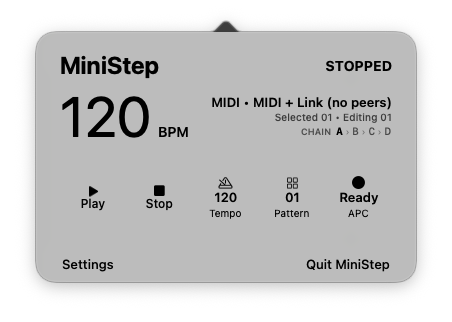
8 tracks, 32 steps. Each sequence holds 8 drum tracks across 4 pages of 8 steps each — 32 steps total per sequence. Navigate pages with the Volume, Pan, Send, and Device buttons on the hardware.
Edit, store, and queue up to 64 patterns. Use Pattern Up and Down to browse any slot while the current pattern keeps playing. The grid remains editable, including on an empty slot, and moving to another slot saves your work. Press Play to start the selected pattern when stopped or queue it for the end of the current cycle.
See every pattern at once. Hold Pattern Up and Pattern Down for a momentary 8×8 overview. The controller distinguishes the playing, edited, queued, saved, and empty patterns by color and animation. When a new pattern takes effect, MiniStep also sends the matching MIDI Program Change on the sequencer channel.
Pattern chaining. Hold Shift and press any page button to enter chain mode. Program the order sequences should play, and MiniStep transitions between them automatically at the end of each cycle. Each page button can hold its own chain.
Ableton Link sync. MiniStep connects to any Link-enabled application on your local network — Ableton Live, Logic Pro, VCV Rack, iOS apps — and locks to the shared tempo and beat grid. No cables, no configuration.
9 faders sending MIDI CC. All nine hardware faders send continuous controller messages on CC 0–8, ready to map to filter cutoffs, send levels, or whatever your drum instrument needs.
Per-step expression. Hold Shift and press any active step to open a visual parameter editor on the 8×8 grid. The first four columns set velocity, probability, maximum repeats, and Ratchet Variation. The remaining four columns become a 32-note chromatic keyboard for per-step pitch. Each value belongs only to the selected step, so changing one hit never alters the rest of its track.
Ratchets, tuplets, and variation. Repeats divide a single sequencer step into evenly spaced notes: 1 plays once, 2 makes a duplet, 3 a triplet, and so on through 8. Ratchet Variation controls how often playback chooses a smaller repeat count, from completely fixed at 0% to a fresh random count at 100%.
Per-step pitch. The editor's 32-note keyboard stores a transpose value for each step. Pattern Up and Down shift its range by an octave, making melodic sample sequences and pitch movement possible without leaving the controller.
Live Performance Mode. Briefly press Shift and the bottom Scene Launch/Stop All Clips button to turn the full grid into 64 live drum pads. The sequencer keeps running underneath while your performance is sent on its own MIDI channel (channel 2 by default, configurable from Settings or Preferences). A dim piano-key color map distinguishes natural notes and accidentals, with middle C illuminated as a reference. Use the same button combination to return to the sequencer.
Independent MIDI routing. Sequencer and Performance output each have a dedicated channel, with defaults of 1 and 2. Choose any channel from 1–16 directly from the compact Settings menu or in Preferences; MiniStep remembers both choices.
Printable sequence sheets. Generate a printed grid of any sequence or all eight at once — useful for session notes, collaboration, or just keeping a paper record of a pattern you like.
Hardware layout
Hold Shift: scene mode
Sequencer
Grid toggle steps · Scene mute tracks · Pages select A–D
Play start / pause · Reset rewind · ↑ ↓ pattern preview
Shift
Shift + step step parameters · Shift + page chain pages
Shift + 7 / 8 tempo down / up · hold Shift for Scene mode
Scene mode
1 length · 2 rate · 3 direction · 4 Euclidean
5 evolve · 6 fill · 7 live performance · 8 live record
Step editor
Columns 1–4: velocity, probability, repeats, ratchet variation.
Columns 5–8: sample tuning · ↑ ↓ octave · Shift close
Pattern preview
↑ ↓ browse slots · Grid / pages edit without interrupting playback.
Play save and start / queue · Reset discard · hold ↑ + ↓ overview
Live modes
Performance: the grid triggers eight sounds while the sequence continues.
Record: bottom row records; other rows erase, mute, select, and edit steps.
The 8×8 pad grid maps directly to tracks and steps. Each row is a drum track; each column is a step within the current page. Lit pads are active steps; dark pads are silent.
The right-hand Scene Launch buttons double as row activity and mute controls. A button lights green when its row contains an active step; press it to mute or unmute the row, with blinking green indicating mute. Briefly press Shift and the bottom Scene Launch/Stop All Clips button to toggle Performance Mode. The transport buttons below the grid handle play, stop, reset, and pattern navigation. Shift also unlocks tempo adjustment, chain mode, and the per-step parameter editor.
Setup
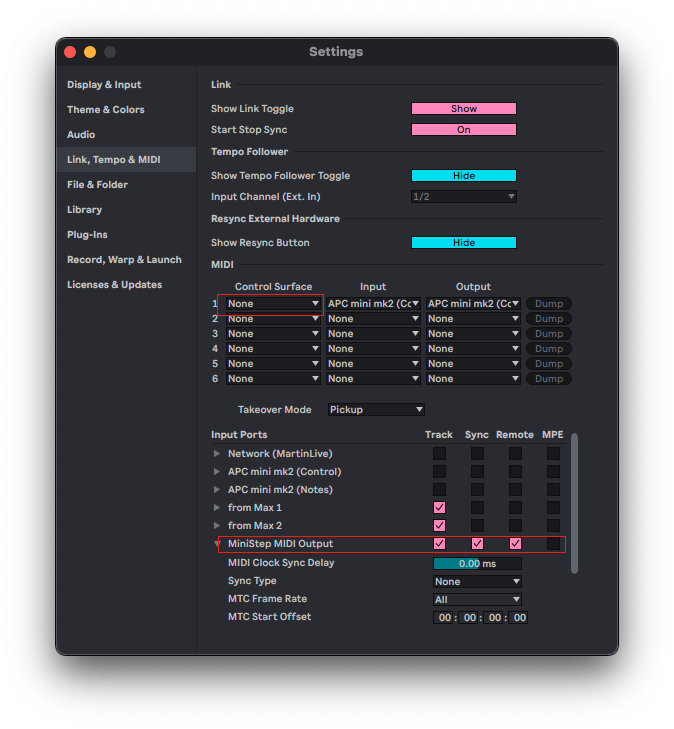
Before launching MiniStep, disable the APCmini mk2 as a control surface in Ableton Live (MIDI preferences → Control Surface → None). Leave the Input and Output set to the device. MiniStep creates its own virtual MIDI port — set your drum instrument to receive from MiniStep MIDI Output.
Connect the APCmini mk2 via USB before opening MiniStep. Once the app launches, the Volume button lights to show the current page. Scene Launch buttons light only for rows containing active steps. The virtual MIDI device appears in your DAW's input list immediately.
Sequence documentation

The print function generates a clean grid showing all 32 steps across all 8 tracks, with tempo and sequence metadata — useful for session notes, collaboration, or keeping a paper record of a pattern.
Features at a glance
- 8 drum tracks × 32 steps (4 pages × 8 steps)
- 64 editable pattern slots with start and queue controls
- 8×8 pattern overview with playing, edited, queued, saved, and empty states
- MIDI Program Change when a queued pattern takes effect
- Pattern chaining — program sequence order per page
- Ableton Link sync — tempo, transport, and beat alignment
- 9 faders sending MIDI CC 0–8
- Per-step velocity, probability, repeats, Ratchet Variation, and pitch
- Per-step repeats from 1–8 for tuplets and ratchets
- 32-note chromatic pitch editor with octave shifting
- Per-row mute controls with activity LEDs
- 64-pad Performance Mode on an independently configurable MIDI channel
- Separate sequencer and performance channels, each selectable from 1–16
- Six ready-made color palettes plus custom track and transport colors
- Printable sequence documentation
- Pattern collections saved as editable JSON
- macOS only — no internet connection required
System requirements
- macOS 11.7 or later
- AKAI APCmini mk2 (required — mk1 and other controllers are not supported)
- No internet connection required for sequencing; local network required for Ableton Link
Available soon for Mac...
Questions? Visit our Support