A quiet editor for Markdown.
Medita is a native macOS editor with on-device review powered by Apple Intelligence. There are no model downloads, accounts, subscriptions, API keys, or cloud providers.

The Vision Behind Medita
Most professional writing begins and ends in Markdown. Whether it is drafting academic papers, documenting complex synthesis patches, or preparing tutorials for Moodle, Markdown provides the necessary structure without the bloat.
However, the creative process often feels fragmented. Writers are frequently forced to cycle through multiple tools: one for drafting, another for media management, and yet another for final export. Medita was designed to bridge these gaps. It is a dedicated environment for composers, sound artists, and technical writers who require a tool that handles audio and images as first-class citizens while maintaining a distraction-free interface.
What it does
Medita keeps the writing experience minimal while covering everything a serious writer needs.
Write in Markdown with ATX (# Heading) or Setext (Heading\n===) heading styles, switchable at any time. Full support for bold, italic, underline, blockquotes, lists, code blocks, horizontal rules, and links.
Embed images and audio using a clean syntax inspired by Pandoc. Drop any image or audio file directly onto the editor and it inserts the correct snippet automatically:
@[Dawn chorus, recorded at 5:14 am](https://www.google.com/search?q=/path/to/audio.wav)
Audio embeds render as a native <audio> player on export — useful for sound designers, musicians, and anyone writing documents that live alongside media.
Export to HTML or DOCX. HTML export creates a portable bundle, including local images and audio. DOCX export converts Markdown headings, emphasis, lists, quotes, links, and code blocks into formatted Word content.
Review on your Mac. Hit Review to look for genuine logical issues: contradictions, unsupported conclusions, non-sequiturs, category errors, and orphan claims. The review model is Apple Intelligence’s on-device Foundation Model, not a bundled third-party model.
Large documents are reviewed in measured, bounded sections so the app stays within Apple Intelligence’s on-device context window. Medita uses compact instructions, structured results where possible, and a graceful text fallback if a structured model response cannot be read. Your document is processed locally by the system model.
Example export
Here is a sample document written in Medita and exported to HTML — a short field recording journal entry using headings, bold and italic text, a blockquote, an image, and an audio embed.
# Field Notes — March
## Dawn chorus, old-growth forest
I arrived before sunrise, while the fog was still **dense enough to muffle footsteps**. The forest sounded different — closer, more contained. By 5:14 am the birds had started, layered and overlapping in a way that no single recording can fully resolve.
> The acoustics of an old-growth forest are unlike anything a room can reproduce. The canopy acts as a diffuser; the ground, wet with dew, as an absorber. What reaches the microphone is already a mix.
I set up two cardioid microphones in an *ORTF configuration*, about two metres off the ground, pointing into the canopy. The recording ran for forty minutes. The excerpt below captures the first wave of activity just after first light.
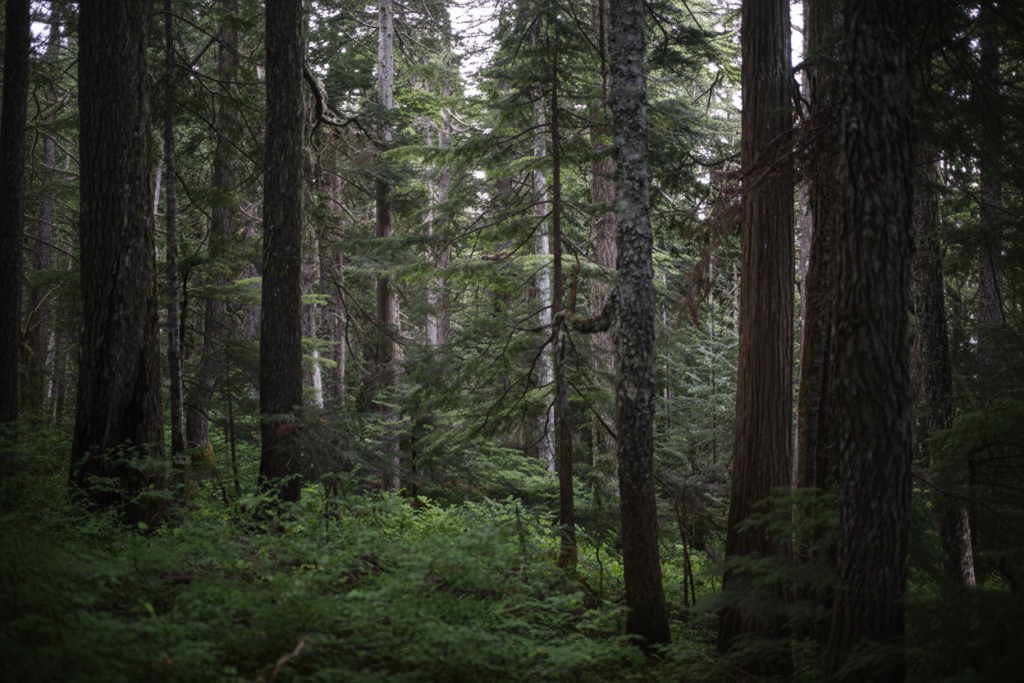
@[Dawn chorus recorded at 5:14 am — ORTF, 40m excerpt](/audio/birds.mp3)
Field Notes — March
Dawn chorus, old-growth forest
I arrived before sunrise, while the fog was still dense enough to muffle footsteps. The forest sounded different — closer, more contained. By 5:14 am the birds had started, layered and overlapping in a way that no single recording can fully resolve.
The acoustics of an old-growth forest are unlike anything a room can reproduce. The canopy acts as a diffuser; the ground, wet with dew, as an absorber. What reaches the microphone is already a mix.
I set up an Ambisonics microphone, about two metres off the ground, to capture the sound field. The recording ran for forty minutes. The excerpt below captures the first wave of activity just after first light.
 Morning mist filtering through the canopy, old-growth forest
Features at a glance
- Native macOS menus, keyboard shortcuts, and undo support
- Markdown heading styles: ATX and Setext
- Audio embed support —
@[label](path)renders as a captioned player on export - Image embed with drag-and-drop
- Portable HTML/media bundles and formatted DOCX export
- On-device AI review — powered by Apple Intelligence’s Foundation Models framework
- Context-aware review for long documents
- Four editor fonts: Lora, JetBrains Mono, Inter, Atkinson Hyperlegible
- Light, dark, and system-native themes
- Autosave
- Word count
- Find and replace, print, recent documents, and command palette
- Quick command window (F2)
- Keyboard shortcuts for all formatting
- No internet connection required
System requirements
- macOS Tahoe 26 or later
- A Mac and region supported by Apple Intelligence
- Apple Intelligence enabled, with its on-device model ready
- No model download, API key, or third-party AI account required
Availability
Medita will be available through the Mac App Store. Pricing, regional availability, and purchase options will be shown there.
Questions? Contact us: info@wandersound.ca